
Mr. Grummel locks the apps you lose time to until you answer three quiz questions.

Why do you keep reaching for your phone?
Checking your phone is a habit loop: a cue (a buzz, a hard question, a pause), a quick action (unlock, scroll) and a small reward (something new). Revision is full of cues, because the moment a problem gets hard, the phone offers something easier.
The cue alone already costs you. In a 2015 experiment, people doing an attention task made more mistakes after their phone rang or buzzed with a text they never answered, and the drop was comparable to what earlier studies found for actually using a phone.
So the fix is not more willpower. It is fewer cues and a longer path to the reward.
Where should your phone be while you study?
In another room, if nobody needs to reach you. Walking over to fetch it takes long enough for you to notice what you are doing, and a phone you can't see can't light up.
A widely shared 2017 study went further: students whose phone was in another room scored higher on memory and reasoning tests than students with it face-down on the desk, though nobody touched their phone. That result is less certain than the headlines made it sound. A 2022 replication found no difference, while a 2023 meta-analysis of 22 studies found an overall negative effect of phones on memory and attention, though not on every kind of task. Either way, distance removes the easy reach, and that part needs no study.
| Where the phone is | What it costs you | Use it when |
|---|---|---|
| Face-up on the desk | Every buzz and lit screen is a cue | Never during a study block |
| Face-down or in your pocket | Fewer cues, still one reach away | Only with notifications off |
| In your bag across the room | You have to get up for it | You need it nearby for calls |
| In another room | Fetching it breaks the reflex | Nobody needs to reach you |
How do you turn the cues off?
- Turn off notifications for every social and news app, not just during revision. You can still open them; they just stop calling you.
- Use a Focus mode or Do Not Disturb so calls from family still get through.
- Move social apps off your home screen, into a folder on the last page.
- Switch the screen to greyscale for study sessions, so colourful feeds lose some of their pull.
How do you make unlocking cost something?
When the phone has to stay close, put a step between the urge and the feed. Small steps work better than you would expect. In a six-week study of the app one sec, which makes you wait a few seconds before a chosen app opens, people closed the app again in 36% of their attempts, and by week six they tried to open those apps 37% less often than in week one.
An app blocker is the strongest version of this: the apps you pick stay locked until you meet a condition. Lock the two or three apps you open on autopilot, not everything. A blocker you switch off on day two helps no one.
When should you check your phone?
At set times. Holding off for three hours is much harder than holding off until the next break, so decide when the next break is before you start.
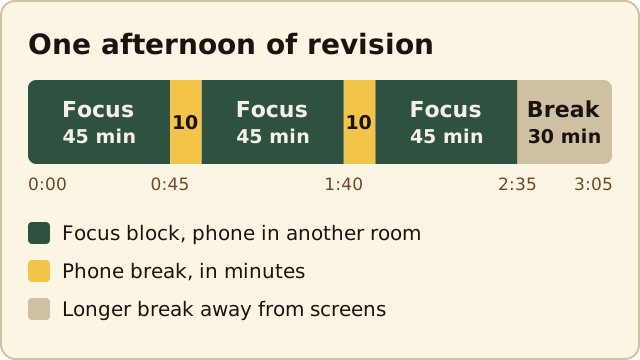
- Pick a block length you can finish: 25 minutes if you check constantly now, 45 to 60 once that feels easy.
- Write down what the block is for, for example "chapter 4, problems 1 to 6".
- Phone away, timer on.
- At the break, check messages for 5 to 10 minutes, then put the phone back before the next block starts.
- After three or four blocks, take a longer break away from screens.
Why it matters for exams: in a term-long study at Rutgers, students did just as well on quizzes in lectures where phones and laptops were allowed, but worse on the later exams that covered those lectures. Divided attention didn't hurt understanding on the day. It hurt what they still remembered weeks later.
What should you do when you slip?
You will check your phone sometimes. Don't write the session off. Put the phone back, restart the timer and note what pulled you in: a notification, a hard problem or plain boredom. If it is the same app every time, that is the one to lock.
Questions people ask
Is it better to turn my phone off or put it in another room?
Another room, if nobody needs to reach you. A phone that is off but within reach is one button away; a phone in another room is a walk away. If you must stay reachable, leave it in another room with a Focus mode that lets a few people's calls through.
How long should I study before checking my phone?
Start with 25 minutes if you check constantly now, and work up to 45 to 60. The right length is the longest block you can finish without breaking it, so the break stays a reward rather than an escape.
Do app blockers actually help you study?
They help most when you lock only the apps you open without thinking, and when getting back in takes real effort. In a 2023 study, even a few seconds of delay made people abandon about a third of their attempts to open a locked app.
Does Mr. Grummel work on Android?
Not on Google Play yet. Mr. Grummel is out on iPhone, and Android is in a closed beta you can join on this page.
Sources
- Stothart, Mitchum & Yehnert (2015). The attentional cost of receiving a cell phone notification. Journal of Experimental Psychology: Human Perception and Performance.
- Ward, Duke, Gneezy & Bos (2017). Brain drain: the mere presence of one's own smartphone reduces available cognitive capacity. Journal of the Association for Consumer Research.
- Ruiz Pardo & Minda (2022). Reexamining the "brain drain" effect: a replication of Ward et al. (2017). Acta Psychologica.
- Böttger, Poschik & Zierer (2023). Does the brain drain effect really exist? A meta-analysis. Behavioral Sciences.
- Grüning, Riedel & Lorenz-Spreen (2023). Directing smartphone use through the self-nudge app one sec. PNAS.
- Glass & Kang (2019). Dividing attention in the classroom reduces exam performance. Educational Psychology.
Make your next unlock teach you something
Mr. Grummel locks the apps you lose time to. Three questions in a row get you back in, for as long as you choose.
7 days free, then $4.99 a month. iPhone only for now.
On Android? Join the beta.